








Welcome to Cyndi–our LMM Techy Contributor! Today she is going to share some wonderful tips and tricks about SEO for your blog! Take it away Cyndi.
__________________________
Hi everyone! Today I am going to explain the basics of SEO and share some quick SEO you can implement on your blogs right now.
As a blogger, you’ve heard of Search Engine Optimization. Maybe you’ve already done some research and started optimizing your posts. But, if you’re like most bloggers, it seems just too scary and complicated. Well, I’m going to make it less scary. Although SEO sounds intimidating, anyone can understand the basics of how it works, how it is set up on their site, and what parts are most important to get done (asap!).
This post contains (a very simplified) outline that describes how search engines view your site and what needs to be done to optimize correctly.
Let’s get started!
What is SEO?
You could have the most fabulous looking site EVER and still have horrible search rankings. This is simply because Google (and other search engines of course) only care about the content of your site. Because that’s all they can see.
When the Googlebot “crawls” your site it is simply reading all your code, and that typically looks something like this: (To see the code source of a site, just right click on it and go to “page source”)
*Click on the image to view it full sized
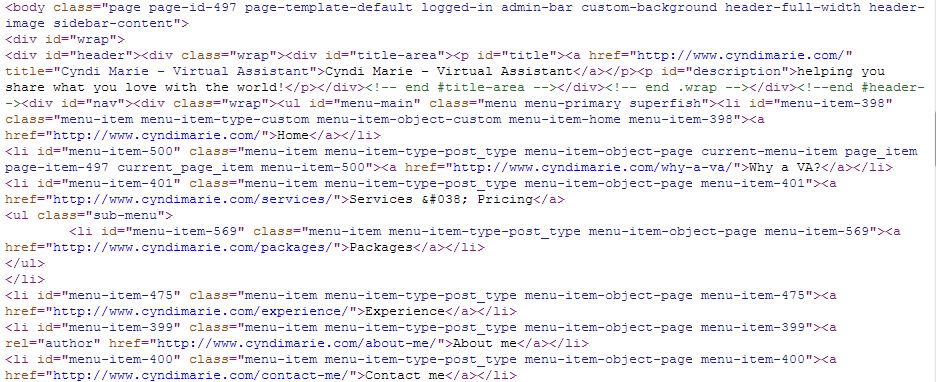
Yuck right?
So the bots read over that, and they pick out certain info that is used to list and rank your site. This is a simplified representation of how search engines see that code as far as SEO goes:
*Click on the image to view it full sized
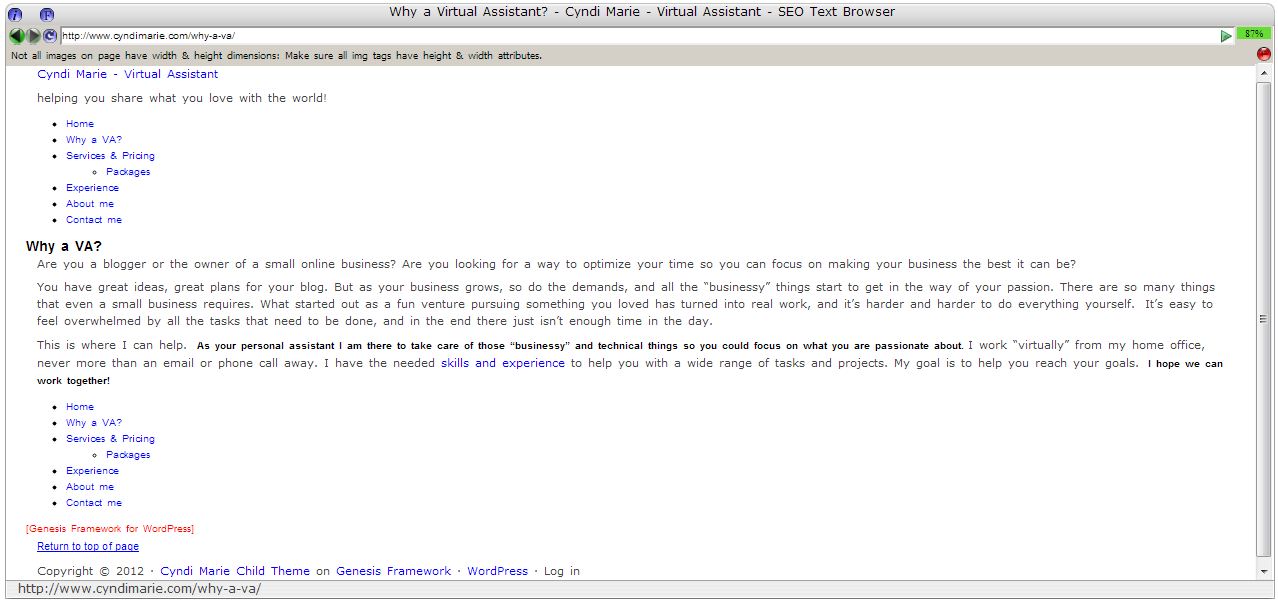
We can break the content of a site down to 2 major categories: #1 the actual content (what you can read on the site), and #2 the meta information.
- Actual Website Content Includes:
- All text on the page. This could include things like:
- Page/Post titles
- Headings: <h1>, <h2>…
- All content text
- All sidebar text
- Link anchor text
- Bold text
- Larger text
- All text on the page. This could include things like:
- Meta Information: This is text that is not actually seen on the page itself, but is put in the code to help search engines gain more info about your site. Includes:
- Image alt text
- Image file names: “this-is-a-pic.jpg”
- Meta Titles
- Meta Keywords
- Meta Descriptions
To optimize a post, you want to take advantage of all those parts, filling them with information that accurately represents the topic of your blog post. The more information Google has about your post (or your site), the easier it is to classify it and display it in relevant search results. This is SEO: The process of optimizing your blog or website to improve your visibility and natural search result position.
See? Not so complicated after all.
Quick SEO you can do now
All right, ready for some quick SEO you can do right now to get started? Part of the reason bloggers shy away from doing any SEO is because the thought of going through all of their past posts and pages to optimize them all at once is totally daunting (and quite frankly, unrealistic.) Nobody has time for that. So the key is to START NOW! Implement these 4 SEO tips the next time you post:
- Install and Set Up WordPress SEO: This plugin will help you automate portions of your SEO process (like page and post titles) and has tons of other awesome features that will make SEO much easier to understand and do.
- Home Page Meta Description: Add a meta description to your home page. This is a brief (less than 160 characters) description that search engines will use to list your website. Make sure the description accurately represents the topics you cover most often on your blog, includes a call to action (“click here”…), and includes your name (if you want your name to be associated with your blog). Where do you find the spot to add a home page meta description? This will depend on your theme, so look around all the setting areas until you find it. If you are using the WordPress SEO plugin, the meta description templates are in the “Titles and Metas” section.
- Image SEO: Remember, START NOW!
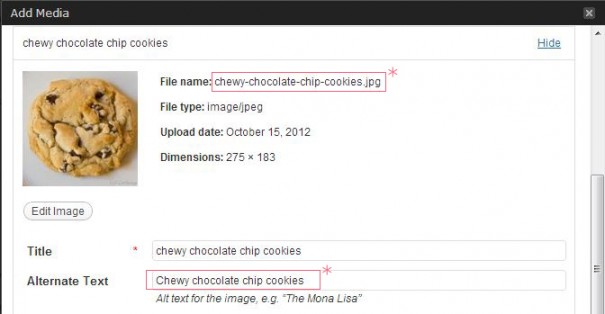
- Before you upload any images, change all your image file titles to something more descriptive. A picture titled chewy-chocolate-chip-cookies.jpg is much more SEO-friendly than one titled DSC_3841.jpg.
- Make sure you add a descriptive Alternative text (Alt tag). Remember, search engines can’t see images, so you have to (briefly) describe it to them.
- Keywords for SEO: Remember, START NOW!
For each post/page, choose one keyword/key-phrase, and include it as part of these key places:- Post title
- Post URL (permalink)
- Post meta description
- Post content: use it multiple times here, especially towards the beginning of the post and in headings/bold text.
- In at least one image alt tag
Make sure that throughout your post you are using other words and phrases that people might search for to find a post like yours. Remember though, search engines are looking for quality, genuine content; don’t make your keyword-density un-naturally thick, because that can result in a penalty.
So remember, START NOW! Make simple SEO a part of your regular posting routine, and reap the benefits of improved search position!
